
'%3e%3cpath%20fill='%23fff'%20d='M-20%200h720v480H-20z'/%3e%3cpath%20fill='%23df0000'%20d='M-20%200h720v240H-20z'/%3e%3cpath%20fill='%23fff'%20d='M146%2040.2a84.4%2084.4%200%200%200%20.8%20165.2%2086%2086%200%200%201-106.6-59%2086%2086%200%200%201%2059-106c16-4.6%2030.8-4.7%2046.9-.2z'/%3e%3cpath%20fill='%23fff'%20d='m133%20110%204.9%2015-13-9.2-12.8%209.4%204.7-15.2-12.8-9.3%2015.9-.2%205-15%205%2015h15.8zm17.5%2052%205%2015.1-13-9.2-12.9%209.3%204.8-15.1-12.8-9.4%2015.9-.1%204.9-15.1%205%2015h16zm58.5-.4%204.9%2015.2-13-9.3-12.8%209.3%204.7-15.1-12.8-9.3%2015.9-.2%205-15%205%2015h15.8zm17.4-51.6%204.9%2015.1-13-9.2-12.8%209.3%204.8-15.1-12.9-9.4%2016-.1%204.8-15.1%205%2015h16zm-46.3-34.3%205%2015.2-13-9.3-12.9%209.4%204.8-15.2-12.8-9.4%2015.8-.1%205-15.1%205%2015h16z'/%3e%3c/g%3e%3c/svg%3e)
'%3e%3cpath%20fill='%23C00'%20d='M0%200h640v480H0z'/%3e%3cpath%20fill='%23C00'%20d='M0%200h640v34.3H0z'/%3e%3cpath%20fill='%23fff'%20d='M0%2034.3h640v34.3H0z'/%3e%3cpath%20fill='%23C00'%20d='M0%2068.6h640v34.3H0z'/%3e%3cpath%20fill='%23fff'%20d='M0%20102.9h640V137H0z'/%3e%3cpath%20fill='%23C00'%20d='M0%20137.1h640v34.3H0z'/%3e%3cpath%20fill='%23fff'%20d='M0%20171.4h640v34.3H0z'/%3e%3cpath%20fill='%23C00'%20d='M0%20205.7h640V240H0z'/%3e%3cpath%20fill='%23fff'%20d='M0%20240h640v34.3H0z'/%3e%3cpath%20fill='%23C00'%20d='M0%20274.3h640v34.3H0z'/%3e%3cpath%20fill='%23fff'%20d='M0%20308.6h640v34.3H0z'/%3e%3cpath%20fill='%23C00'%20d='M0%20342.9h640V377H0z'/%3e%3cpath%20fill='%23fff'%20d='M0%20377.1h640v34.3H0z'/%3e%3cpath%20fill='%23C00'%20d='M0%20411.4h640v34.3H0z'/%3e%3cpath%20fill='%23fff'%20d='M0%20445.7h640V480H0z'/%3e%3cpath%20fill='%23006'%20d='M0%20.5h320v274.3H0z'/%3e%3cpath%20fill='%23FC0'%20d='m207.5%2073.8%206%2040.7%2023-34-12.4%2039.2%2035.5-20.8-28.1%2030%2041-3.2-38.3%2014.8%2038.3%2014.8-41-3.2%2028.1%2030-35.5-20.8%2012.3%2039.3-23-34.1-6%2040.7-5.9-40.7-23%2034%2012.4-39.2-35.5%2020.8%2028-30-41%203.2%2038.4-14.8-38.3-14.8%2041%203.2-28.1-30%2035.5%2020.8-12.4-39.3%2023%2034.1zm-33.3%201.7a71%2071%200%200%200-100%2065%2071%2071%200%200%200%20100%2065%2080%2080%200%200%201-83.2%206.2%2080%2080%200%200%201-43.4-71.2%2080%2080%200%200%201%20126.6-65'/%3e%3c/g%3e%3cdefs%3e%3cclipPath%20id='my-a'%3e%3cpath%20fill='%23fff'%20d='M0%200h640v480H0z'/%3e%3c/clipPath%3e%3c/defs%3e%3c/svg%3e)

'%20transform='translate(80)scale(.9375)'%3e%3cpath%20fill='%23da251d'%20d='M-128%200h768v512h-768z'/%3e%3cpath%20fill='%23ff0'%20d='M349.6%20381%20260%20314.3l-89%2067.3L204%20272l-89-67.7%20110.1-1%2034.2-109.4L294%20203l110.1.1-88.5%2068.4%2033.9%20109.6z'/%3e%3c/g%3e%3c/svg%3e)


The honest 2026 answer: BK8 lists GCash, and your GCash money still works there, but not with a one-tap button. Since the BSP’s August 2025 order, wallet money goes in by paying BK8’s QR Ph or bank details from the GCash app, or as USDT bought in GCrypto. Both routes are on this page, step by step, plus how your pesos get back to GCash. For the scores and full test, read our BK8 review; for sign-up fields and login fixes, the BK8 login guide.
What changed in August 2025
On 14 August 2025 the Bangko Sentral ng Pilipinas issued Memorandum M-2025-029, ordering e-wallets to cut their links to online gambling. On 16 August the gambling links in GCash’s GLife and in Maya’s Games section went dark. PAGCOR has been lobbying the BSP to restore them; as of this update, nothing has changed.
So “pay with GCash” at a casino now means one of two things: paying the operator’s QR Ph or bank details from your GCash app, or converting GCash pesos to USDT. BK8 supports both.
Route 1: GCash money in BK8’s peso cashier
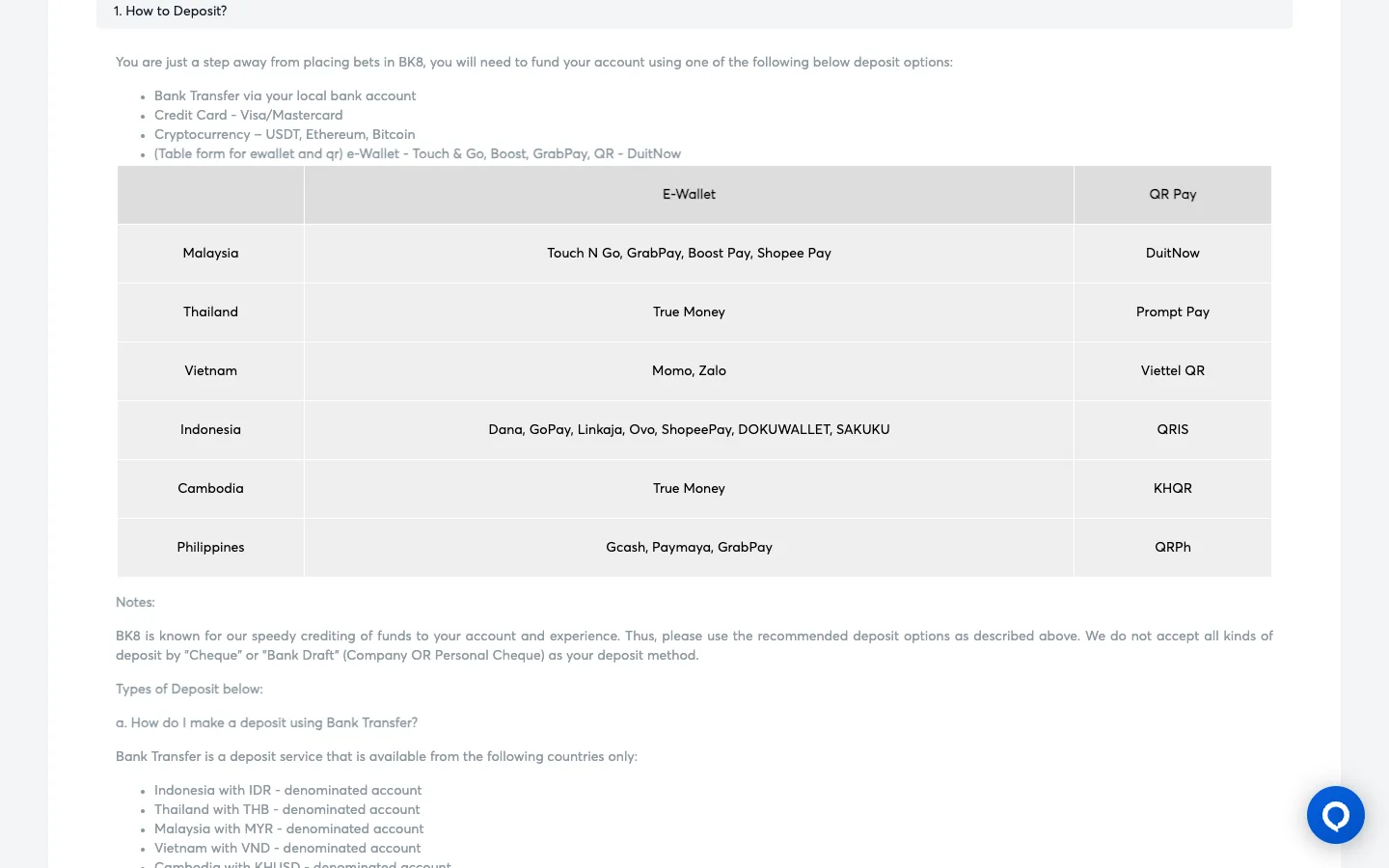
BK8’s payment guide lists GCash, Paymaya and GrabPay as e-wallets and QR Ph as QR pay for the Philippines, next to PHP bank transfer (the footer shows BDO, Landbank and CIMB) and crypto. The live options appear in the cashier after you log in.
- Sign up with a PHP account. BK8’s form is preset to +63 and Philippine Peso. Type your full name exactly as it appears on your bank account.
- Log in and tap Deposit. Pick the QR Ph or Bank Transfer option shown that day.
- Pay from your GCash app using the QR code or account details, for the exact amount and within any time limit shown.
- Finish the last step. For bank transfers, BK8 asks you to fill in the transfer details, upload a copy of the receipt and tap Submit. The money reaches your Main Wallet about 2–15 minutes after verification.
- Claim the bonus. Transfer at least ₱300 from your Main Wallet to the game wallet you want and pick the promo code. The 100% welcome gives up to ₱5,000 at 12x the deposit plus bonus.
Durian tip: Never write “BK8” or any gambling word in the transfer reference, and pay only from a GCash or bank account in your own name. BK8 says it doesn’t accept third-party payments, and it pays withdrawals to a bank account in your registered name only.
Route 2: GCash → GCrypto → USDT
This route works whatever the peso cashier shows that day. You need a Fully Verified GCash account, a verified email, and to be 18 or older for GCrypto (BK8’s own terms set 21+ for play).
- In the GCash app, open GInvest → GCrypto and set it up if it’s your first time.
- Top up your Trading Wallet with the pesos you want to play.
- Buy USDT on Tron (TRC-20). GCrypto lists USDT on more than one network, so choose the Tron version. The minimum order is 1 USDT.
- In BK8, tap Deposit → Crypto → USDT, choose the TRC-20 network and copy the address.
- In GCrypto, tap USDT → Send, paste the address, check the network and confirm. Sends over ₱50,000 ask for extra recipient details and an OTP that PDAX, GCrypto’s partner, emails you.
- BK8 credits USDT in up to 3 minutes once verified, at the exchange rate shown on screen.
Match the network on both sides: TRC-20 in GCrypto, TRC-20 at BK8. Crypto sent on the wrong network can’t be reversed, so do a small test send the first time. The same route works at all four casinos we review for the Philippines; see our GCash casinos page and crypto casinos list.
Getting your pesos back to GCash
| Bank route | GCrypto route | |
|---|---|---|
| Where BK8 pays | A PHP bank account in your registered name | USDT to your GCrypto receive address (same currency as you deposited) |
| Processing | Within 25 minutes per BK8’s FAQ; AskGamblers lists 0–1 hours | USDT in up to 3 minutes, then the blockchain confirms |
| Last step | Move pesos from your bank app to GCash | Sell USDT for pesos in GCrypto, then Withdraw to your GCash wallet |
| Fees | None from BK8; your bank may charge | Tron network fee per send |
| Daily limit | VIP from ₱400,000 (Bronze) to unlimited (Diamond); regular limit not published | Same, plus GCash’s own Trading Wallet limits |
Two rules apply either way: play your deposit through at least once, and finish any bonus turnover before you request a payout. BK8 may also ask for a photo ID and a bank statement before a withdrawal, so upload them early. Compare timings on our fast payout list.
Which route should you use?
- Want the peso bonus and JILI? Route 1. Your balance stays in pesos, the ₱300 bonus transfer is simple, and BK8 is the only one of our four PH picks on the low wagering list.
- QR Ph not showing today, or you’d rather skip the bank? Route 2. USDT lands in minutes, in and out.
- Using Maya instead? BK8 lists Paymaya too. Our Maya casinos page covers the same two routes with Maya Crypto.
Skip any “GCash agent” or personal number offering to load your BK8 account: a stranger receives your money and you can’t trace it. Pay the casino’s own details or use GCrypto, nothing else. Safety check first? Read is BK8 legit.
21+ only. Set a budget before you buy any USDT or scan any QR, cash out your panalo while you’re ahead, and if it stops being fun, our responsible gambling page has free help.