
'%3e%3cpath%20fill='%23fff'%20d='M-20%200h720v480H-20z'/%3e%3cpath%20fill='%23df0000'%20d='M-20%200h720v240H-20z'/%3e%3cpath%20fill='%23fff'%20d='M146%2040.2a84.4%2084.4%200%200%200%20.8%20165.2%2086%2086%200%200%201-106.6-59%2086%2086%200%200%201%2059-106c16-4.6%2030.8-4.7%2046.9-.2z'/%3e%3cpath%20fill='%23fff'%20d='m133%20110%204.9%2015-13-9.2-12.8%209.4%204.7-15.2-12.8-9.3%2015.9-.2%205-15%205%2015h15.8zm17.5%2052%205%2015.1-13-9.2-12.9%209.3%204.8-15.1-12.8-9.4%2015.9-.1%204.9-15.1%205%2015h16zm58.5-.4%204.9%2015.2-13-9.3-12.8%209.3%204.7-15.1-12.8-9.3%2015.9-.2%205-15%205%2015h15.8zm17.4-51.6%204.9%2015.1-13-9.2-12.8%209.3%204.8-15.1-12.9-9.4%2016-.1%204.8-15.1%205%2015h16zm-46.3-34.3%205%2015.2-13-9.3-12.9%209.4%204.8-15.2-12.8-9.4%2015.8-.1%205-15.1%205%2015h16z'/%3e%3c/g%3e%3c/svg%3e)
'%3e%3cpath%20fill='%23C00'%20d='M0%200h640v480H0z'/%3e%3cpath%20fill='%23C00'%20d='M0%200h640v34.3H0z'/%3e%3cpath%20fill='%23fff'%20d='M0%2034.3h640v34.3H0z'/%3e%3cpath%20fill='%23C00'%20d='M0%2068.6h640v34.3H0z'/%3e%3cpath%20fill='%23fff'%20d='M0%20102.9h640V137H0z'/%3e%3cpath%20fill='%23C00'%20d='M0%20137.1h640v34.3H0z'/%3e%3cpath%20fill='%23fff'%20d='M0%20171.4h640v34.3H0z'/%3e%3cpath%20fill='%23C00'%20d='M0%20205.7h640V240H0z'/%3e%3cpath%20fill='%23fff'%20d='M0%20240h640v34.3H0z'/%3e%3cpath%20fill='%23C00'%20d='M0%20274.3h640v34.3H0z'/%3e%3cpath%20fill='%23fff'%20d='M0%20308.6h640v34.3H0z'/%3e%3cpath%20fill='%23C00'%20d='M0%20342.9h640V377H0z'/%3e%3cpath%20fill='%23fff'%20d='M0%20377.1h640v34.3H0z'/%3e%3cpath%20fill='%23C00'%20d='M0%20411.4h640v34.3H0z'/%3e%3cpath%20fill='%23fff'%20d='M0%20445.7h640V480H0z'/%3e%3cpath%20fill='%23006'%20d='M0%20.5h320v274.3H0z'/%3e%3cpath%20fill='%23FC0'%20d='m207.5%2073.8%206%2040.7%2023-34-12.4%2039.2%2035.5-20.8-28.1%2030%2041-3.2-38.3%2014.8%2038.3%2014.8-41-3.2%2028.1%2030-35.5-20.8%2012.3%2039.3-23-34.1-6%2040.7-5.9-40.7-23%2034%2012.4-39.2-35.5%2020.8%2028-30-41%203.2%2038.4-14.8-38.3-14.8%2041%203.2-28.1-30%2035.5%2020.8-12.4-39.3%2023%2034.1zm-33.3%201.7a71%2071%200%200%200-100%2065%2071%2071%200%200%200%20100%2065%2080%2080%200%200%201-83.2%206.2%2080%2080%200%200%201-43.4-71.2%2080%2080%200%200%201%20126.6-65'/%3e%3c/g%3e%3cdefs%3e%3cclipPath%20id='my-a'%3e%3cpath%20fill='%23fff'%20d='M0%200h640v480H0z'/%3e%3c/clipPath%3e%3c/defs%3e%3c/svg%3e)

'%20transform='translate(80)scale(.9375)'%3e%3cpath%20fill='%23da251d'%20d='M-128%200h768v512h-768z'/%3e%3cpath%20fill='%23ff0'%20d='M349.6%20381%20260%20314.3l-89%2067.3L204%20272l-89-67.7%20110.1-1%2034.2-109.4L294%20203l110.1.1-88.5%2068.4%2033.9%20109.6z'/%3e%3c/g%3e%3c/svg%3e)


The honest 2026 answer: BC.Game shows GCash on its homepage and takes GCash money in its peso cashier, but not through a one-tap link. Since the BSP’s August 2025 order, you pay through the Fiat tab from your GCash app, or you send USDT bought in GCrypto, which is BC.Game’s home turf anyway. Both routes are below, plus how your pesos come back. For the scores and full test, read our BC.Game review; for sign-up, login fixes and KYC, the BC.Game login guide.
What changed in August 2025
On 14 August 2025 the Bangko Sentral ng Pilipinas issued Memorandum M-2025-029, ordering e-wallets to cut their links to online gambling. On 16 August the gambling links in GCash’s GLife and Maya’s Games section went dark. PAGCOR has been lobbying the BSP to restore them; nothing has changed as of this update.
Your GCash balance still plays. What’s gone is the button that pulled money straight from the wallet. At BC.Game that leaves two routes, and both show in the same cashier.
Route 1: GCash money in the Fiat tab
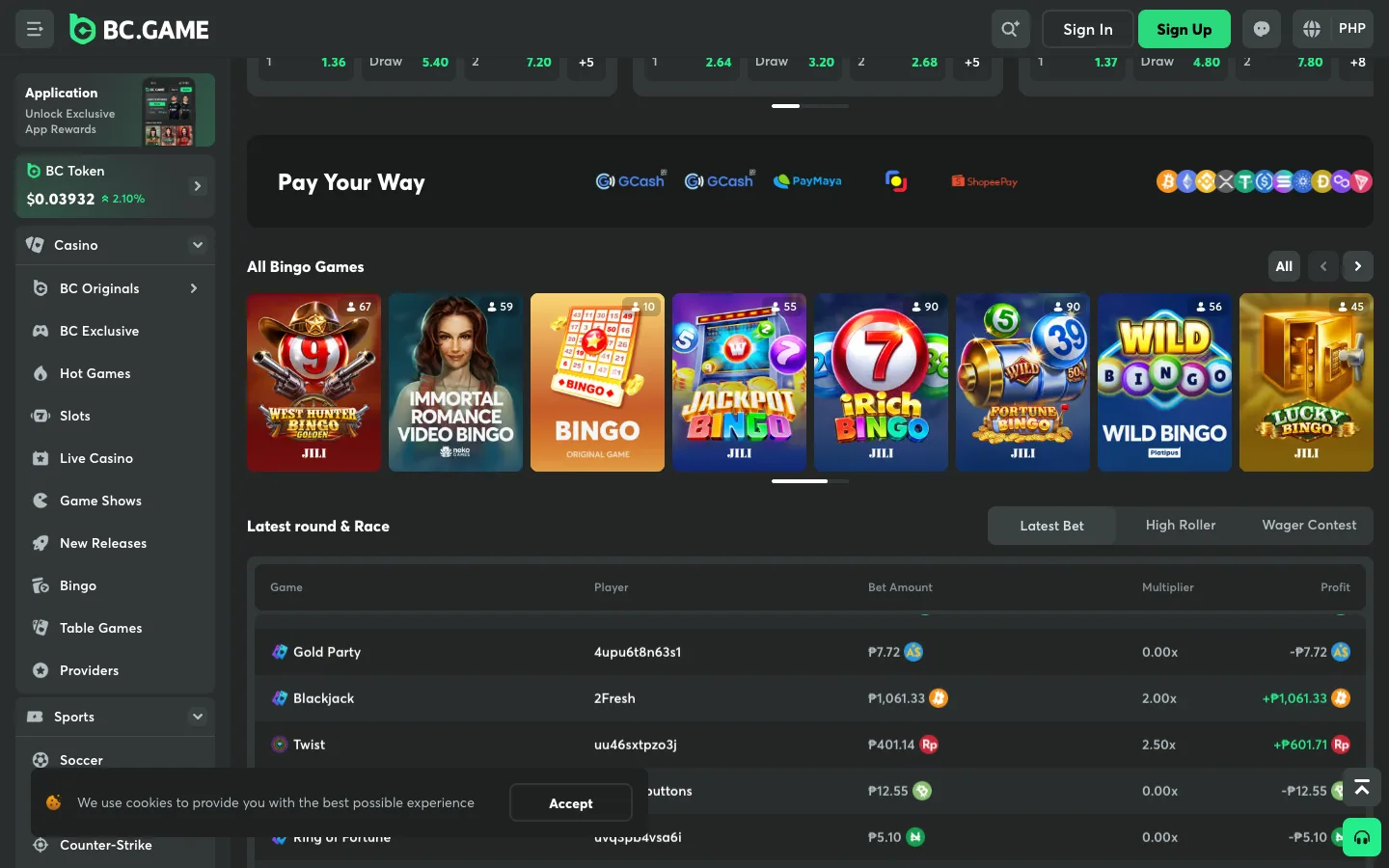
BC.Game runs in pesos for PH visitors: balances, big wins, contest prizes and bonus minimums all show in ₱, and there’s a Filipino version at bc.game/fil/. The peso methods live in the cashier.
- Sign up. Email and password, or one tap with Google, Telegram or Cwallet. There’s no currency field; PH visitors already see PHP.
- Open Wallet → Deposit → Fiat after login and check which GCash, QR Ph or bank options are live that day. The exact list only shows after login.
- Enter the amount: at least ₱200 if you want the first welcome stage.
- Pay from your GCash app through the pop-up payment page or by manual transfer, for the exact amount and within the time limit shown.
- Open the Gift Box and claim the bonus. It goes into your locked Deposit Rakeback balance and unlocks into real cash as you bet.
Durian tip: Make your first deposit soon after signing up. BC.Game says the New User Booster, the extra rakeback on top of the welcome bonus, is for new users and available for 24 hours only. Pay only from a GCash account in your own name, and never type a casino name in a transfer reference.
Route 2: GCash → GCrypto → USDT on TRON
This is the route that works regardless of what the Fiat tab shows on a given day. GCrypto needs a Fully Verified GCash account, a verified email, and you must be 18 or older.
- In the GCash app, open GInvest → GCrypto.
- Top up your Trading Wallet with the pesos you want to play.
- Buy USDT on Tron (TRC-20). GCrypto lists USDT on more than one network; choose the Tron version. The minimum order is 1 USDT.
- In BC.Game, open Wallet → Deposit, pick USDT and the TRON network, and copy the address.
- In GCrypto, tap USDT → Send, paste the address, double-check the network and confirm. Sends over ₱50,000 ask for extra recipient details and an OTP that PDAX, GCrypto’s partner, emails you.
- The USDT appears in your BC.Game wallet once the blockchain confirms, usually within minutes.
TRC-20 in GCrypto, TRON in BC.Game: same network, two names. Crypto sent on the wrong network can’t be pulled back, so do a small test send the first time. You can also use BC.Game’s Buy Crypto option (MoonPay, Banxa) if GCrypto isn’t available to you.
Getting your pesos back to GCash
| Fiat route | GCrypto route | |
|---|---|---|
| How BC.Game pays | Through its fiat channels to your bank | USDT to your GCrypto receive address on TRON |
| Speed | 5 minutes to a few days depending on the bank; AskGamblers lists up to 72 hours for bank transfers | Instant on BC.Game’s side, then the blockchain confirms |
| Last step | Move pesos from your bank app to GCash | Sell USDT for pesos in GCrypto, then Withdraw to your GCash wallet |
| Fees | Depends on the payment gateway; VIP Club members pay none | Network fee only (TRON is among the cheapest) |
| Limits | Shown in the cashier after login | Same, plus GCash’s own Trading Wallet limits |
BC.Game can ask for KYC (a government ID plus a selfie) before a withdrawal, and both casino.guru and AskGamblers note that its complaints cluster around withdrawal delays. Verify right after your first deposit and you skip that queue. Compare timings on our fast payout list.
Which route should you use?
- Want a peso balance and the ₱200 bonus with no conversion? Route 1. Everything stays in ₱, and BC.Game’s lobby of JILI, Fa Chai and PG Soft slots is priced in pesos; see our JILI casinos list.
- Want the fastest cash-out, or the Fiat tab isn’t showing GCash today? Route 2. USDT on TRON is instant out of BC.Game, and GCrypto turns it back into GCash pesos in a few taps.
- Using Maya? The homepage lists PayMaya too; our Maya casinos page covers the Maya Crypto route.
Whatever you pick, skip “GCash agents” and personal numbers offering to load your account. Use the cashier’s own details or GCrypto, nothing else. Want the safety check first? Read is BC.Game legit, or see how the other brands compare on our GCash casinos page.
21+ only. Set a budget before you buy any USDT or open any payment page, cash out your panalo while you’re ahead, and if it stops being fun, our responsible gambling page has free help.